
Choose the information to structure
Starbase is a beta tool for collections and records. Use a collection when several items share the same kinds of information, such as a title, image, description or date. Start by identifying those fields before adding many records.
Select the site and create or open the collection. Give fields names that explain their purpose and choose the supported field types that fit the content. Add a small set of representative records first.
Check the record shape
Include a record with short content, one with longer content and one without optional values. This makes it easier to see whether the fields and the eventual page layout can handle real variation.
When you connect collection content to a supported Studio element or page, choose the intended collection and field bindings. Preview more than one record. Keep conditions for missing values understandable; see Layouts and conditions.
Watch the site record allowance
The record limit is a hard total across the site's collections. Draft and archived records count toward that total. Check the current allowance before importing or adding a large number of records.
Collection access and editing follow site permissions. Give people access to the work they need, and review the public result after publishing pages that display the collection.
Open collections without leaving simple Studio
Use Starbase in the Studio rail to open the site's collection workspace. Select a collection, then use Records, Fields or Settings. Close the collection workspace to return to the canvas; simple editor mode is preserved.
New collection index pages use an editable List-card layout, while record templates use the site's theme colors and responsive typography. Check the collection binding, empty-record state and more than one record before publishing. Collection records and record-template designers are separate from live native-page collaboration.
Choose library media or visitor pictures
The former Picture kind is now Media (Internal). It uses your site media library; existing picture fields keep their values. Media (External) holds pictures submitted through an Uploader block. Choose whether that field appears on a page as an Image or an Uploader.
To collect a picture, create the Media (External) field, add an Uploader block and select the collection and field in its controls. Review the surrounding explanation and linked legal pages before publishing. Supported submissions are JPG, PNG, WebP or GIF, up to 8 MB. The service checks and re-encodes each picture as WebP, removes embedded metadata and reduces large images to at most 2560 pixels on their longest side.
Each accepted picture becomes a draft record and appears in the media library’s User Uploads folder. It counts toward storage, and submission is refused if the storage allowance is exhausted. Review the picture and publish the intended record before it appears in a published collection list. A draft record is not listed publicly, but its stored media URL can be opened by anyone holding that URL; this is not private file storage.
The interactive Starbase sample shows how fictional record fields supply a website card. Its changes stay in memory.
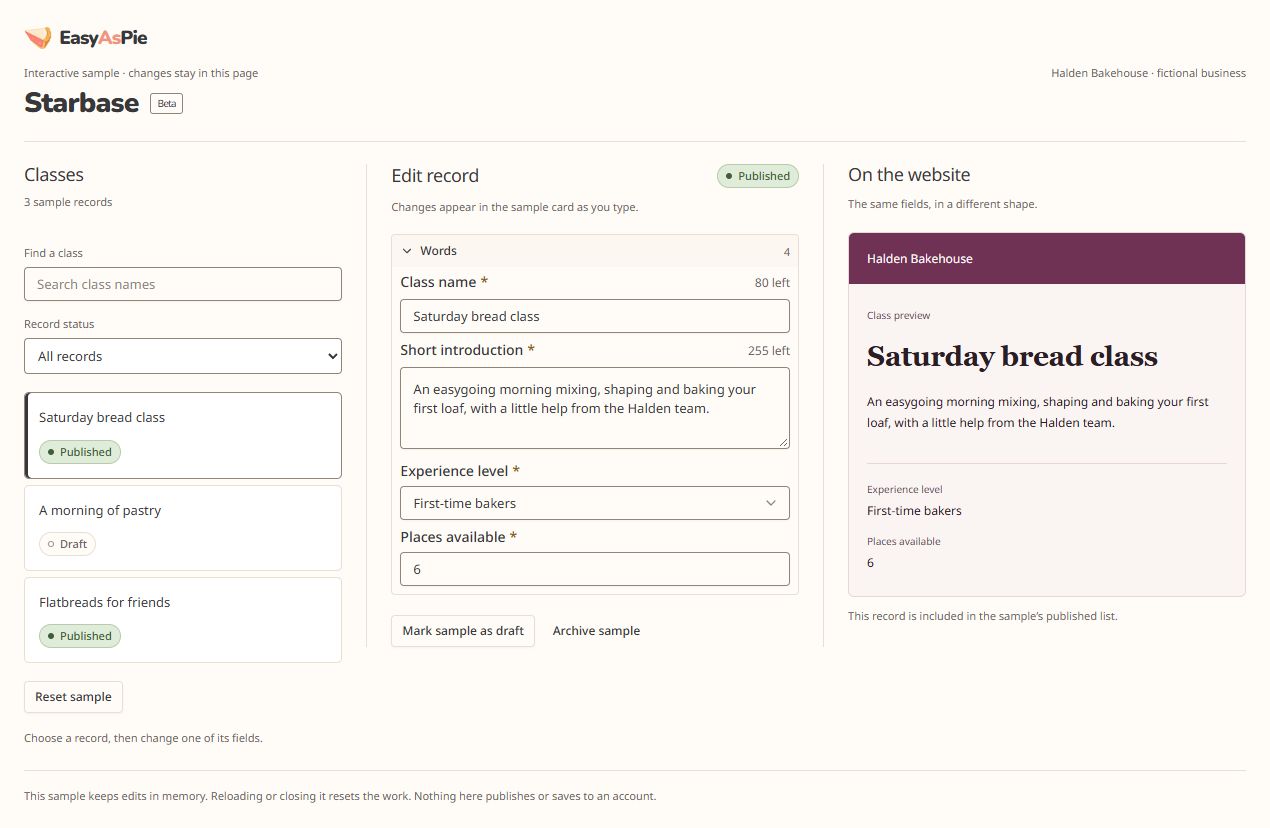 The Halden Bakehouse sample uses fictional class records. Changes stay in the sample and do not update an account site.Viewport 1270 × 714px